event booking system: seats, waitlist, door list and fees

Paste your bookings for one event: seats booked, parties seated, the waitlist, money still due at the door and the ticket service fees a platform would take, on screen.

event booking system: seats, waitlist, door list and fees
Example of the result this page gives you

Example (made-up): a 40-seat Tuesday Supper Club at $60 a seat, 11 parties booked by phone, email and DM.

Try it freeFull version · $220 / year →

Selected: 1-year subscription — $220 for 12 months, paid up front.

Prefer to pay monthly? $22 / month

Renewal and cancellation: the 1-year subscription renews automatically every 12 months at $220 until you cancel. Cancel any time before the renewal date in your Whop account (Profile → Orders → Cancel membership); you keep access until the end of the year you paid for and are not charged again.

How it works
  1. Put your own numbers into the free version below — no sign-up.
  2. Your result shows up right here, as you type.
  3. Want to keep it, print it or do it again next time? That is what the full version adds — see "What you get".

Published 2026-11-08 · ReadyStack

Try it freeFull version →

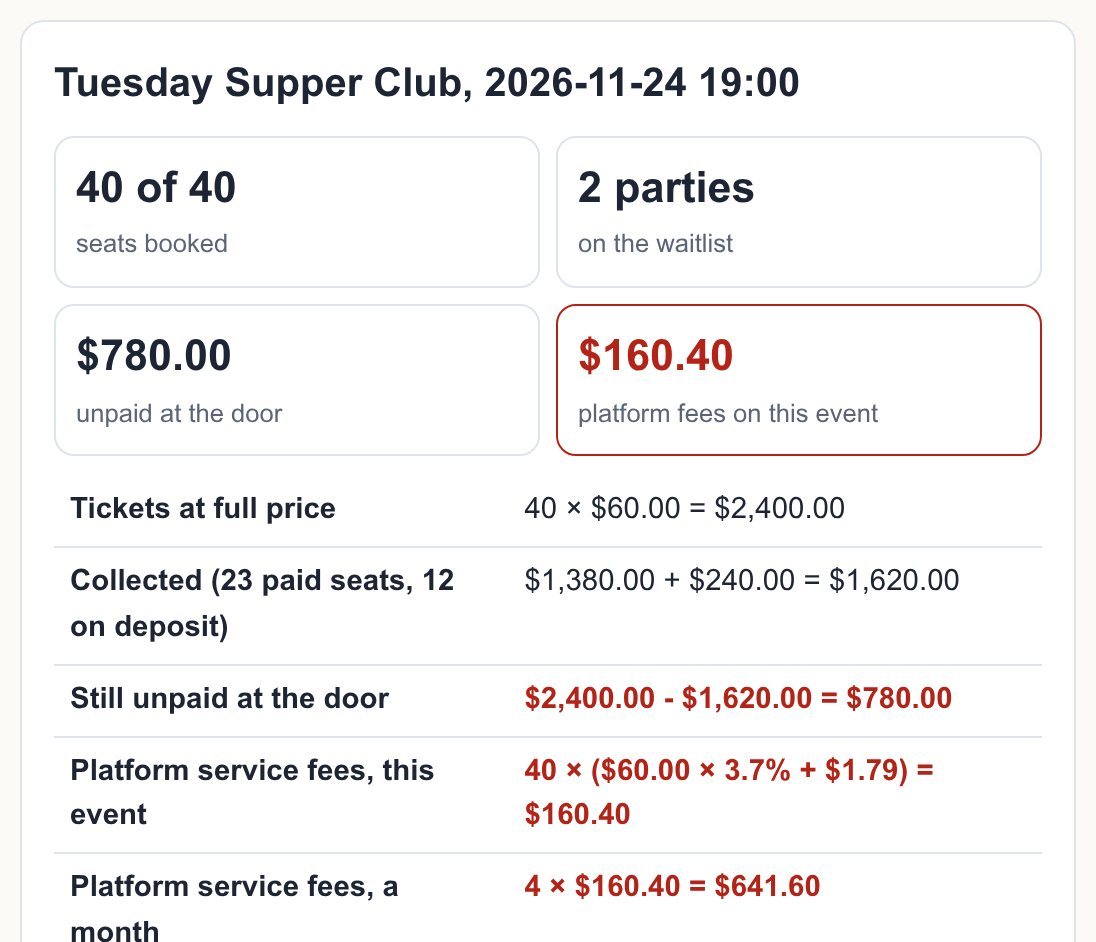
Example (made-up): a 40-seat Tuesday Supper Club at $60 a seat, 11 parties booked by phone, email and DM. The list below seats 9 parties in 40 of 40 seats, puts 2 parties on the waitlist, finds $780.00 still unpaid at the door, and shows that a ticketing platform at 3.7% + $1.79 per ticket would lose you $160.40 in service fees on this one dinner (40 × ($60.00 × 3.7% + $1.79) = $160.40), or $641.60 a month at 4 dinners.

One flat plan, not a fee on every ticket. Per-ticket fees are what hosts and their guests complain about. Eventbrite's US service fee is 3.7% + $1.79 per paid ticket, plus 2.9% payment processing per order (eventbrite.com/organizer/pricing, read 2026-11-08). Here bookings come to you by link, email or phone, your guests pay you the way they already do, and the fee line below shows what that keeps.

Your event
Bookings, in the order they came in

Guest booking requests from your Pro link paste straight in (lines that start with BOOKING REQUEST).

Ticket fee comparison

Defaults: Eventbrite US service fee, 3.7% + $1.79 per paid ticket (read 2026-11-08). Put in your own platform's numbers to compare.

Your bookings stay in this browser (localStorage). No account, no guest data sent anywhere.

Tuesday Supper Club, 2026-11-24 19:00

40 of 40seats booked
2 partieson the waitlist
$780.00unpaid at the door
$160.40platform fees on this event
Tickets at full price40 × $60.00 = $2,400.00
Collected (23 paid seats, 12 on deposit)$1,380.00 + $240.00 = $1,620.00
Still unpaid at the door$2,400.00 - $1,620.00 = $780.00
Platform service fees, this event40 × ($60.00 × 3.7% + $1.79) = $160.40
Platform service fees, a month4 × $160.40 = $641.60
You keep after platform fees$2,400.00 - $160.40 = $2,239.60

Check: Ben Ito has paid but is on the waitlist: give them a seat or return their payment.

Door list (tick guests as they arrive)

InNamePartyPaymentContact / note

Waitlist

    Pro: run every event from here

    Pro adds 6 things: an event book for every date, a guest booking link, repeat next week, the printable door list (PDF), CSV export and .ics reminders the day before. $22 per month. Get Pro · $22 / month

    Have a key?

    How this event booking system works

    First come, first seated. Bookings are seated in the order you list them. A party is never split: if it is bigger than the seats left it goes to the waitlist, and a smaller party that booked later can still take the seats that are left.

    Money. Paid seats count at full price, deposit seats at the deposit, unpaid seats at zero. What is left is due at the door.

    Fees. The fee line uses the per-ticket formula you enter. Card processing (2.9% per order on Eventbrite; 2.9% + 30¢ per transaction on Stripe's US pricing, read 2026-11-08) is charged by whichever card processor you use, so it is shown apart and not counted as a saving.

    Guest booking link (Pro). Guests open your link, see the event, and send a booking request to your email. Paste the request lines into the list and they are seated or waitlisted like every other booking.
    Book a table

    Your request goes to the host by email. The host confirms your seats.

    This tool is 1 of 333 paid tools in English. All 333 with one key: Freelancer & Small Business Pass — $9.99/month · $79/year · Deadline reminders by email (free)

    Email me this result
    A copy of what you see above, in your inbox — the tool stays free, nothing here is locked.
    People like you also use
    ReadyStack Pass — every tool in one subscription · All tools →

    Questions and answers

    What does this page do?

    Paste your bookings for one event: seats booked, parties seated, the waitlist, money still due at the door and the ticket service fees a platform would take, on screen.

    Is it free?

    Yes. The free version on this page works without an account. The full version costs $22 / month.

    How do I use it?

    1. Put your own numbers into the free version below — no sign-up. 2. Your result shows up right here, as you type. 3. Want to keep it, print it or do it again next time? That is what the full version adds — see "What you get".

    Ask about this tool

    One question, answered by the person who built it. Your email only if you want the answer sent.

    Privacy: your e-mail is used only to send you the answer. A question appears on this page only after it is answered, without your e-mail.

    For a team or company: for an invoice with your company details, a quote or several licences, write to support@getreadystack.com.

    Who is behind this page

    ReadyStack is a small team. We build each tool for one job people keep asking about, from the rules and sources named on the page, and we run it on the worked example you see here before it goes live.

    How we check our pages: each rule names its source and the day we read it.

    Something looks wrong, or you are stuck? Write to support@getreadystack.com or use the contact form. It goes to our own inbox, not to a bot.

    About ReadyStack

    Your next step