Cookie consent Shopify app tester: does your banner's Accept and Reject really work?

Paste three readouts from your own store and get 11 checks with the reason for each. No app to install, no store login, nothing uploaded.

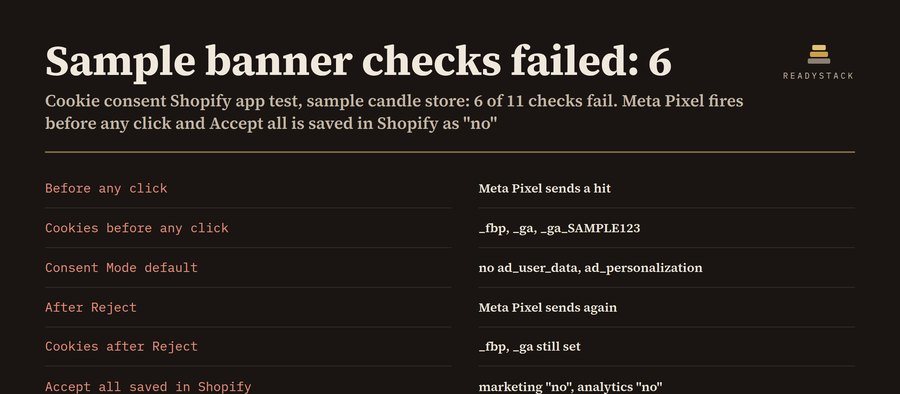
A banner can look fine and still let the Meta Pixel fire before anyone clicks, or save “Accept all” in Shopify as “no” so your ads lose every consented visitor.

Cookie consent Shopify app tester: does your banner's Accept and Reject really work?
Example of the result this page gives you

Try it freeFull version · $59 per year →

Renewal and cancellation: the 1-year subscription renews automatically every 12 months at $59 until you cancel. Cancel any time before the renewal date in your Whop account (Profile → Orders → Cancel membership); you keep access until the end of the year you paid for and are not charged again.

How it works
  1. Put your own numbers into the free version below — no sign-up.
  2. Your result shows up right here, as you type.
  3. Want to keep it, print it or do it again next time? That is what the full version adds — see "What you get".

Published 2026-10-22 · ReadyStack

Try it freeFull version →

A banner can look fine and still let the Meta Pixel fire before anyone clicks, or save “Accept all” in Shopify as “no” so your ads lose every consented visitor. Paste three readouts from your own store and get 11 checks with the reason for each. No app to install, no store login, nothing uploaded.

1 · Copy the readout line

  1. Before: open your store in a new private window. Do not click the banner. Open the browser console (F12, or Cmd+Option+J on a Mac), paste the line, press Enter. The readout is copied; paste it in box A.
  2. Reject: click Reject (or “Decline”) on the banner, reload the page, run the line again, paste in box B.
  3. Accept: open a new private window, click Accept all, reload, run the line again, paste in box C.

The line only reads your own page in your own browser: the consent Shopify stored, the cookie names, the addresses the page called and Google consent commands. If the console says the copy failed, right-click the printed line and choose “Copy string contents”.

2 · Paste the three readouts

Paste at least one readout, or load the sample store, to see the checks.

Pro keeps this from breaking quietly: every test saved and dated per store, what changed since the last test, a re-test reminder for your calendar, a scan of your theme zip for leftover cookie-app code and hard-coded pixels (file and line), the cookie list and test history as CSV, a printable test record, several stores with a backup file. $59 per year or $7.99 per month.

Get Pro: $59 per year $7.99 per month

Have a Pro key?

Questions

Does it work with any cookie banner?

Yes. It does not read the banner's settings; it reads what happens: what your page calls and sets, and the consent Shopify stores after each click. Shopify's own banner, an app from the Shopify App Store and a banner built into the theme are all tested the same way.

What about pixels I added under Settings → Customer events?

Those run in Shopify's sandbox and follow the consent Shopify holds. Checks 6 and 9 test exactly that value, so if Reject and Accept are saved right, those pixels behave. Everything else on the page (theme code, tag manager, app scripts) shows up in the readouts.

Why the Consent Mode v2 checks?

Google needs ad_user_data and ad_personalization, not only ad_storage and analytics_storage, to use consented visitors from the EEA for ads measurement and audiences. A banner that only sends the two old signals passes the eye test and still cuts your ads off.

A testing tool for your own store, not legal advice. Whether a cookie needs consent where you sell is for you or your adviser to decide.
Questions and answers

What does this page do?

Test your Shopify cookie consent banner on your own store: 11 checks on what loads before the visitor answers, after Reject and after Accept, read.

Is it free?

Yes. The free version on this page works without an account. The full version costs $59 per year.

How do I use it?

1. Put your own numbers into the free version below — no sign-up. 2. Your result shows up right here, as you type. 3. Want to keep it, print it or do it again next time? That is what the full version adds — see "What you get".

Ask about this tool

One question, answered by the person who built it. Your email only if you want the answer sent.

Privacy: your e-mail is used only to send you the answer. A question appears on this page only after it is answered, without your e-mail.

For a team or company: for an invoice with your company details, a quote or several licences, write to support@getreadystack.com.

Who is behind this page

ReadyStack is a small team. We build each tool for one job people keep asking about, from the rules and sources named on the page, and we run it on the worked example you see here before it goes live.

How we check our pages: each rule names its source and the day we read it.

Something looks wrong, or you are stuck? Write to support@getreadystack.com or use the contact form. It goes to our own inbox, not to a bot.

About ReadyStack

Email me this result
A copy of what you see above, in your inbox — the tool stays free, nothing here is locked.

More tools for the same work

Accounting Shopify appFree versionShopify PDF invoice appFree versionPrint on demand (POD) Shopify app checkFree versionAffiliate program Shopify appFree version
People like you also use
Everything for Online sellers → · Ecom Seller Toolkit · de to en translation for Shopify · Ecom Research Suite · ReadyStack Pass — every tool in one subscription · All tools →